Shops
Shops are wherever the server puts them. Every shop is a page of cards, and every card is one item to buy or sell.
Kinds of shop
| Shop | What it looks like |
|---|---|
| Vendor Post | A figure of the server's choosing |
| Market Stall | A two-block shop front in one of eight styles: timber booth, vending terminal, boiler booth, player-built, blackstone shrine, street cart, dockside, mage's pedestal |
| Stall Display | A stand that floats one shop's wares above it, one at a time |
Right-click any of them to open the shop. Shop screens are drawn larger where your window has room; you can set the size yourself in config/bsp_core-client.toml (screenPercent under [shop], 100 to 200, 130 by default). On a Market Stall, the left lamp is green with stock and red when sold out (or, for a card the shop only buys, once its shop-wide sell limit is used up), and the right lamp is amber while the shop is open.
Buying and selling
Each card shows the item, the price to buy in gold, the price to sell dimmer beside it, and a star when it buys instantly.
| To | Do this |
|---|---|
| Buy | Left-click a card |
| Sell | Right-click a card |
| Sell every full lot you carry | Shift and right-click |
| Sell a pile at once | Drop items into the Sell Here box. Closing it sells every full lot the shop buys and hands back the rest. |
Prices are usually in Shatter Pieces, from your bank account. A shop may also charge coins or items. Shops with more than one page of cards have a search box: type two letters or more, or @create to show one mod's items, and click a result to jump to its card.
Limits and refills
A card can limit how many you may buy or sell, either for you alone or for everyone. Its corner shows what is left, for example 3/4: green for what you can still buy, amber for what the shop will still take, and red OUT or FULL at zero. A sale that would pass a limit sells what is left. Hover the card to see when it refills.
| Refill rule | |
|---|---|
| Never | Once it is gone, it is gone |
| After a countdown | Such as 90 minutes, 12 hours or 2 days after it runs out |
| Daily | Every day at a set time |
| Weekly | On a set day and time |
| Each rotation | When a rotating shop changes |
On the network, stock, limits and rotating cards are the same on every server.
Rotating shops and offers
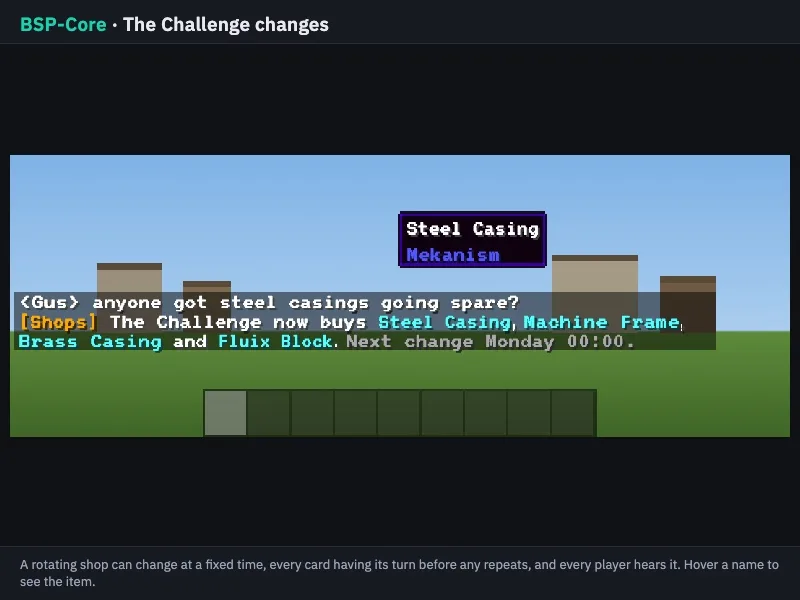
- Rotating shops change what is on offer, often at a fixed time such as Monday 00:00. Some show every card before any repeat. The change is announced in chat: "[Shops] Challenge now buys ... Next change Monday 00:00", and hovering a name shows the item. A rotating shop only buys the cards on show.
- Special offers cut prices until a set time.
- Some shops keep opening hours.
Used items and notes
A card can take any of an item, used or new: worn machines and renamed tools are fine, but not damaged ones ("That one is damaged; this shop only takes it whole.") or ones holding items ("Empty it first: it holds items."). Some cards carry a short note in amber at the foot of the tooltip.
Locked cards and shops
A card can need a rank or playtime. A locked card is dimmed with a padlock and says what it needs, such as "Gold rank and up" or "10 h play"; its tooltip shows your progress ("Played: 4 h 12 m of 10 h"). A whole shop can be hidden from players who do not qualify.
Shops on the Shopping Network also open from a Portable Banker.
Safe trading
- If you leave in the middle of a trade, nothing moves.
- A purchase that completes after you leave is delivered at your next login.
- If the bank refuses a sale, your items come back.
- The Sell Here box keeps your items if you log out, and never takes a totem.
- Placeholders for a missing mod's item are never bought or sold.
What they sell
Anything the server chooses, including Access Tokens for the other servers.
Describes BSP-Core 1.6.2. Numbers are the defaults; the server's settings may differ.