Kits
A kit is a bundle of items the server hands out. Nothing is ever lost on the way.
Getting kits
Kits come three ways:
- at your first login;
- as a reward when you reach a rank;
- from the kit browser: the KITS button in the top-left corner of your inventory, a key you set in Controls, or
/kits.
Reading a card
Every kit you may see is a card: its picture, its name, and what stands between you and it.
| Card | What it means |
|---|---|
| Green | Ready. Press REDEEM and the items land in your inventory. |
| Grey | Taken lately. It says how long until it is ready again, or that it was once only. |
| Rank | Needs that rank; the steps show where you stand and how far there is to go. |
| Server | Taken on that server. |
| Price | A price in pieces, from your bank account. |
| Slots | Needs that much room in your inventory first. |
| Violet | Given to you as a reward or at first login, but it did not fit or came while you were away. Free the slots it names and press TAKE IT. |
Looking inside
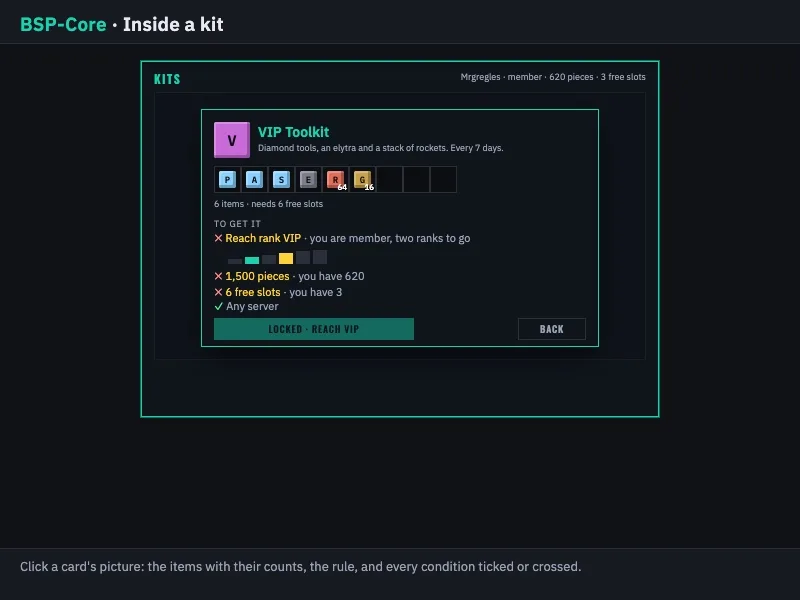
Click a card's picture to see what is in the kit, with the counts, and every condition ticked or crossed. BACK returns to the wall.
Nothing is lost
A kit never goes into an inventory that cannot take it, and a price is only charged after that check. A kit that cannot fit stays waiting until it can. Kits, prizes and other things owed to you are never handed out on the death screen: they arrive after you respawn, and after your inventory has loaded when you switch servers. On the network, your kits and what you have taken are the same on every server.
Describes BSP-Core 1.6.2. Numbers are the defaults; the server's settings may differ.